Playtime tracking for Retro games, Steam and GOG, and more dashboards
In a previous post I talked about how I'm tracking my data related to video games, and how I visualize them. This post builds on that with two more dashboards, and elaborates how I keep track of my play time across all the platforms I use - retro game consoles, Steam, GOG, and more.
Yes, virtually every platform has some sort of stat tracking, but they're limited to one platform at a time. So I've built something that extends the game catalog info I already had and lets me track everything in one place. It also lets me see which game I played on which device - that wasn't very interesting when I only used Windows machines, but is a lot more so with retro handhelds in the picture.
Let's approach this from the top down: first I'll show you what the resulting dashboards look like, then tell you about how I get the data, then a little technical information.
Dashboards
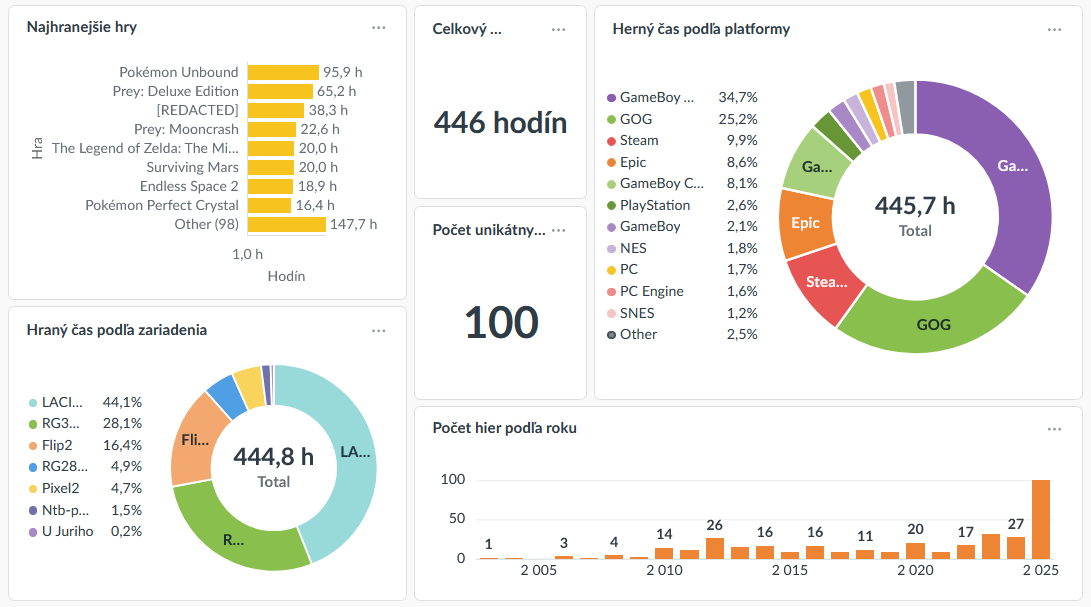
The previous post showed dashboards that provide various overviews of games - what I played in the current year, on what hardware, and so on.
The next two are focused on details of devices and games. They're much simpler and less visually busy.
Device details
After I had more than 1 retro gaming device I wanted to know how much I actually use them, and for what. (I went up to 4 devices, but 2 of them are currently on long-term loans to friends.)
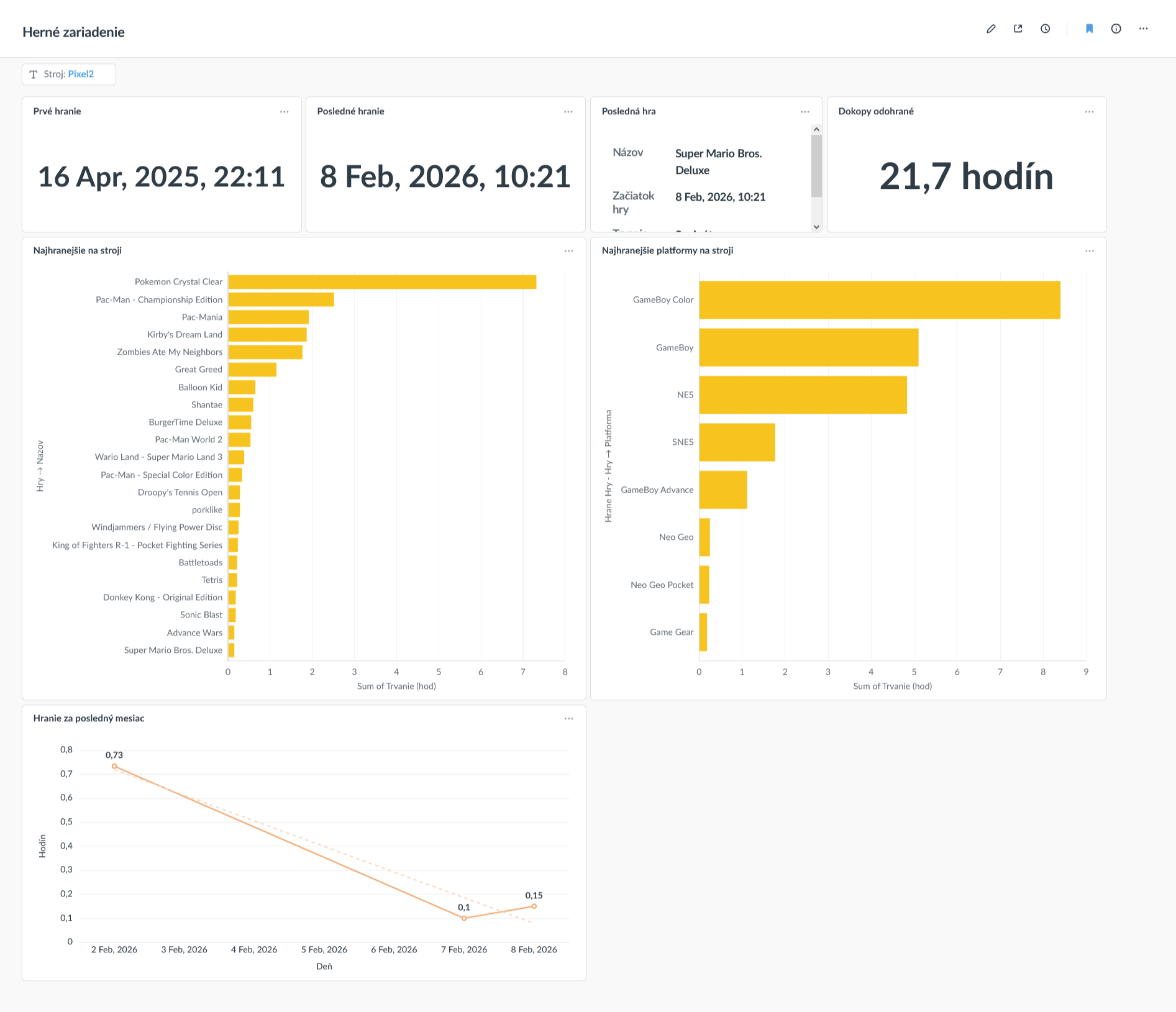
So this dashboard shows when the device was used first and last, what was the last game played on it, how long have I used it in total, which specific games have I played the most, and which platforms those games were on.
On retro handhelds, these platforms are things like GameBoy, Sega Master System, or similar. But the dashboard also shows data from my Windows machines - there the platforms are GOG, Steam, Epic Games, and so on.
Game details
Last but not least, a dashboard that shows an overview of a single game's data.
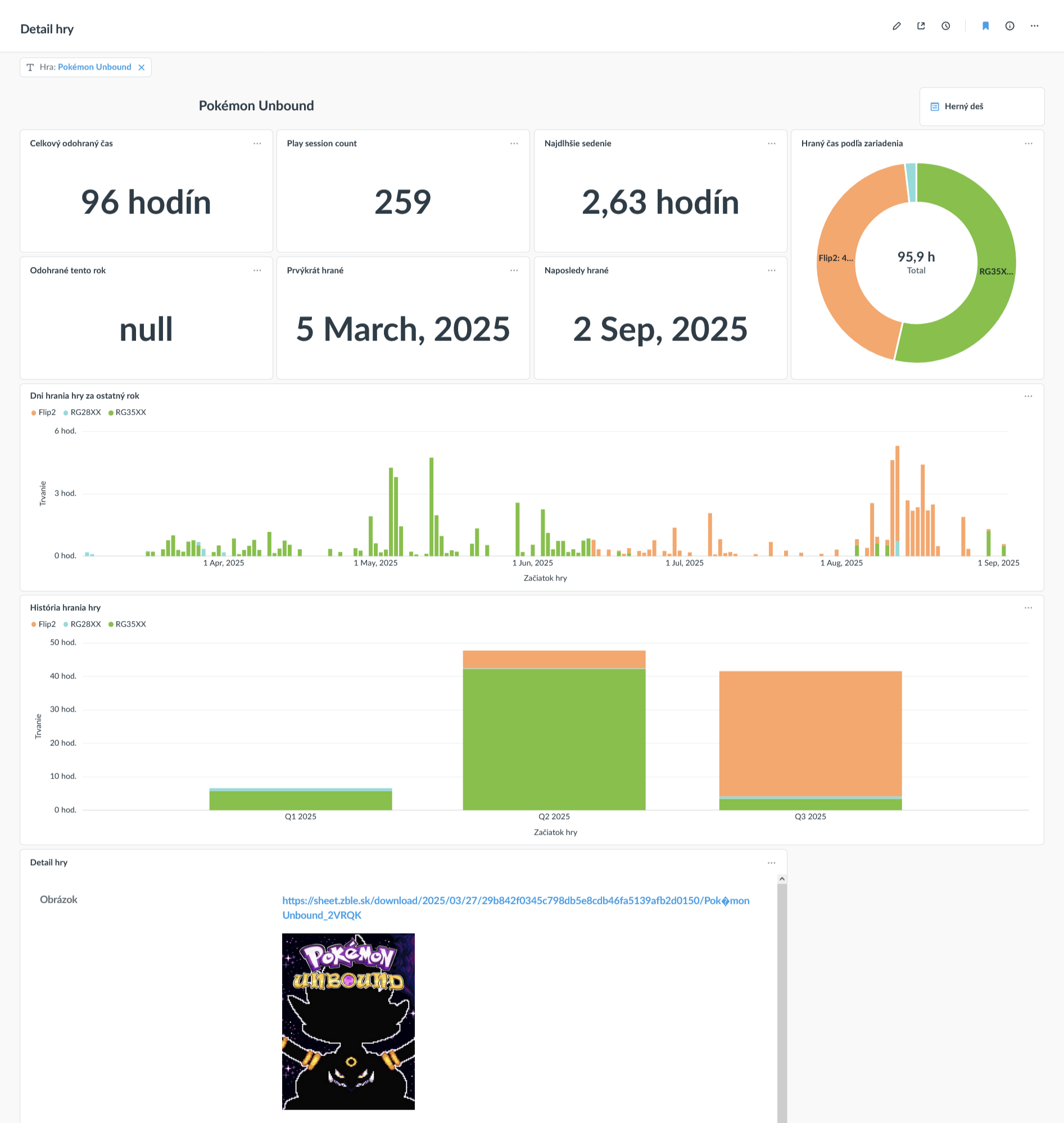
The tiles at the top tell me for how long I played the game, over how many sessions, when I started and stopped playing, etc. The pie chart shows on which devices I played and how much.
Under those the first wide bar chart shows the last year of playing the game - when and on which device. The chart below that shows the same thing, but aggregated by quarters and over the entire history. (That's mostly there because of the few games I keep returning to.)
The last thing is the game's cover art - I'm surprised Metabase doesn't have a better way to show off pictures.
Where do the data come from?
Well, that's the difficult part. I went through multiple iterations. My first use-case was the one I use the least often: I wanted to track free games (mostly roguelikes such as Brogue) that are only distributed as simple executable files from their websites. So I wrote a CLI app that started a game, tracked it until it ended, then wrote the duration into my DB. (That also made it trivial to change things like desktop shortcuts to automatically launch it with this tracking.)
After some time I thought it'd be cool if I could do the same with Steam and GOG games, so I added the option to launch and track those as well. I managed to get it working, but it wasn't flawless. (I used to wish I could just export that data from GOG/Steam; more on that below.)
It ended there for a time; but then I started getting more into the retro games. When I learned that many OSes track playtime - even though most themes don't display it - I went to investigate how to get that data out. But it's a pain in the butt to load them from the consoles.
Then channels like Retro Game Corps, Russ' excellent guides, and TechDweeb got me thinking about how far I could get with Syncthing. So this is what I ended up with:
- The OS saves a change to the metadata every time I play a game
- Syncthing uploads the relevant metadata files to my server
- Every 10 minutes my custom program runs
- It extracts all the metadata from the files
- Since Syncthing knows which console the files came from, that is also included the tracking data
- Then maps them onto games
- If a game already exists in my database, it's used and linked
- Otherwise a new game record is created
- Then it uploads a complete snapshot of the play sessions and their linked data to my DB
- It extracts all the metadata from the files
- All newly added sessions from the snapshot are processed and stored in my PlaySessions table
- A recalculation is triggered, which updates all playtime aggregates.
That entire process takes a couple seconds at most. I've even added some extra niceties - for example, I also track multiple playthroughs: if I beat a game (and mark it as finished in my DB) and later start over again, I create a new record for the second playthrough. The aggregation mechanism recognizes this and keeps the play session aggregates separated by playthrough. So then it's easy to see that - hey, last time I played Dishonored I beat it in 4.5 hours, the time before that was done in 2, and now the total playtime is 6.5 hours; etc.
And that was that! For a time, at least. I then realized that my original solution for GOG and Steam games sucks and I don't like using it. I briefly experimented with a different approach: Once in a while I took Steam's log file, uploaded it to my NocoDB, which triggered logic that processed it, extracted info on what game I played when, then added the play session data. That worked well and had the benefit of being very precise - I knew the exact second when the game started and stopped - but it sucked because of the manual step where I had to upload the file. It's quick and easy to do, but turns out I'm impatient and want my playtime data stats right now and there's no way I'm gonna upload some stupid file that often.
My current solution is this:
- When I log into my computer, a custom program wakes up
- It looks at Steam's logs and uploads all the play session data to my database
- Then it does the same thing for GOG's logs and uploads that info as well, because of course I extended it to GOG as well
- Then it triggers the standard round of playtime statistic updates
That means I can just play my games normally, and the next time I start my computer, everything will just appear in my stats. (Of course I've also added a Matrix notification telling me how many sessions were added, etc.)
It works great and has been rock solid for maybe a year now.
It's a mess
Despite it working very well, there are drawbacks.
People who own multiple retro consoles often like to have a single SD card with their library and gamelists that gets shared among all the devices. That keeps the cost down and makes library maintenance simpler, but many OSes (such as my fave Knulli) keep the configuration on the same card as well. If your Syncthing config is moved between devices along with the games, you'll probably have a problem disambiguating the devices; from its perspective, it's always the same Syncthing config, and therefore the data would appear as coming from a single console. It's just not a problem for me though - I only have a couple of them anyway.
It's also very complex: I wrote a lot of parsers to get all this to work, and there's no guarantee they'll keep working. For example, I had to rewrite the Steam log parser once or twice already because Steam changed how and where the items are logged and my tool just stopped working. That may happen at any time.
Not to mention the retro console gamelists are deceptively disparate. I wrote at least four different parsers for what I originally thought would be covered by one.
For example: the first one I wrote processed Knulli's gamelist.xmls from my RG35XX and it worked flawlessly. I just used the same process for my RG28XX - so far so good. Then I got a Pocket Flip 2 and thought - hey, it's still the same Retroarch and still has gamelists, so no problem, right?
Well, wrong! For some reason this Retroarch keeps its data in a completely different format, and there's less of it. So I had to work around that and write a new parser that processes the .lrtl files. But since they don't contain the total play count (just the time), I had to fudge that a bit.
Then I realized only some systems are emulated via RetroArch, so others won't show up at all, so I wrote a web UI where I could set up a configuration - specify a game + the console I play it on:
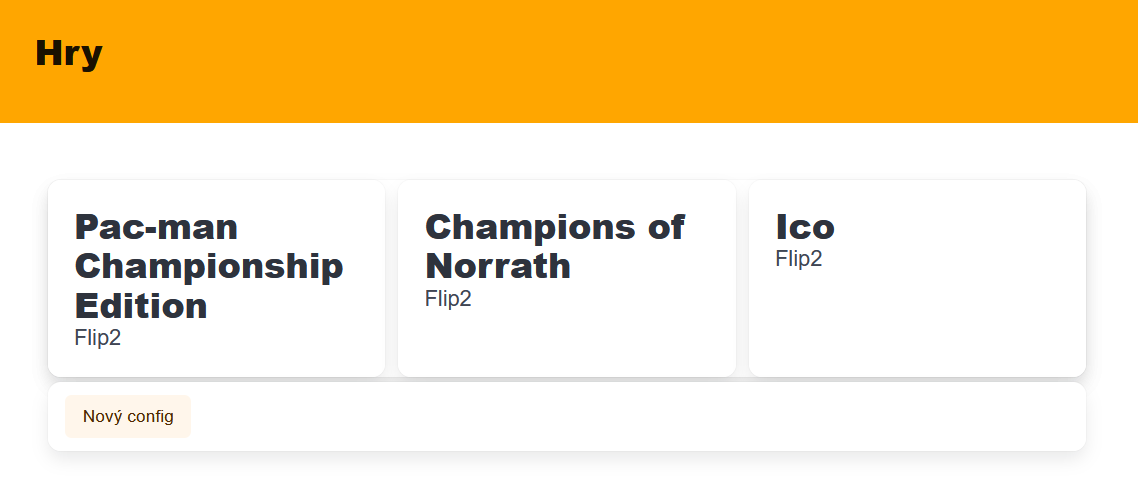
Then I could just click it, enter how long I played and that's it.
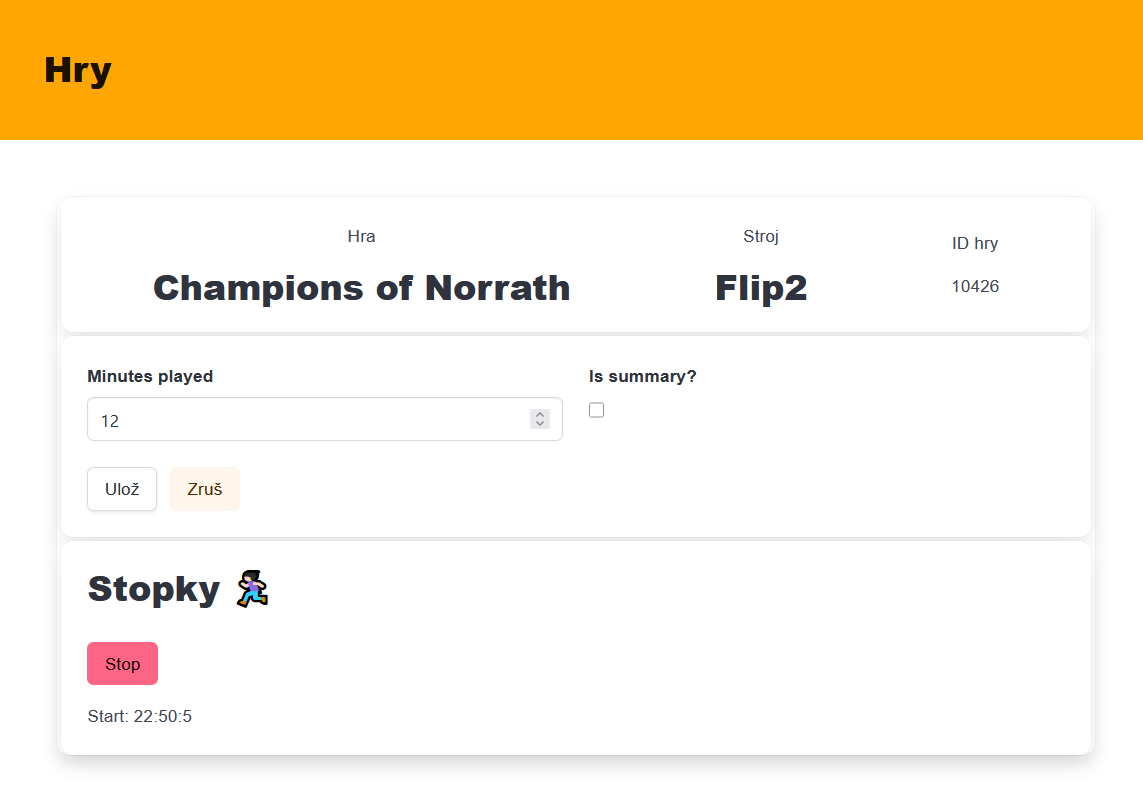
But of course that's too much work, so I also added a stopwatch - I could just hit 'start' when I started playing and 'stop' when I finished.
But then the absolute legends who develop the ES-DE frontend added tracking that just made it work for everything on the Flip 2! That's great! They even use the gamelist.xml format, easy win, yay!
Haha, as if. Their gamelist format is different again, and completely broke my parser because it uses XML fragments instead of a properly rooted document for some reason. I wrote a new parser, which again broke immediately because the lists don't include any kind of ID for the games. That was a doozy, because my entire system relies on every game having a single, unchanging number as its ID in order to work.
So, yeah. The point is: it's a mess. It was a lot of work. I hope nothing breaks anytime soon. But it works so well I don't even have to think about it most of the time.
"That's cool, can I have it?"
Unfortunately, no. For one, it's quite tightly woven into the rest of my software stack. For another, the basis I'm building this on makes it very easy to get things done, but handing a part of it off to someone else is not really possible.
And I've spent zero time on handling the edge cases, which is totally fine for me, but would be a deal-breaker for anyone who does not understand the system well. For example - let's say there is an error in the data. That can happen very easily, for instance when my Game DB contains multiple games with the same name. Maybe I played the GBC version of Pac-Man, but the auto-resolver matched it to an Arcade version instead. No matter: since everything's in NocoDB, I know which table to go to and what records to change manually to fix it. Takes a minute or two, and happens seldom, so I'm not tempted to make the process user friendly. There's a bunch of rough edges like that.
Aside from that, even if it were available, it would be very tedious to set up: You need to configure Syncthing on all retro devices, then actually have a server that has Syncthing and is always running so it can process the gamelists, you need to host the data and dashboard apps on a server as well; you need to install a different app on your computer, configure the locations of the various log files, schedule it for automatic execution, and so on. Since there are so many components on so many different devices, there can't really be a simple "install and it just works" solution.
But I'm really happy that it does what it does and I'm very satisfied with the results.

Comments ()