Highliting with Karakeep and Joplin
I've been searching for a good way of keeping track/remembering all the interesting pieces of information I encounter on the net. This is the latest update of that process.
I've always done this to some degree - Joplin has a nice companion browser extension that let me either scrape the entire page or just a selected part of it. I've used that plenty of times, but it requires too much effort for me to want to do it daily: lots of clipping and copying, switching back and forth, and so on. It feels cumbersome.
I've read a bunch of articles on highlighting, such as the ones from Ton Zijlstra (eg. this one); and while the whole 'public sharing of highlights and notes' is not interesting to me, I quite liked his idea of synchronizing the highlights into my notes.[1] So I've decided to roll my own.
For me, this means integrating with Karakeep (KK), which I mentioned in Changing how I read. It's a read-later app where I can bookmark articles for reading, track my progress in them, and - most importantly - make highlights.
Before embarking on this project I almost never highlighted anything - after more than a year of usage I only had 36 articles with highlights. I didn't see much point in highlighting when I knew I wouldn't be using KK to search for notes - all of mine live in Joplin. So I have written this sync feature and after 6 months of usage I now have highlights in almost 280 articles.
Why it works for me
The best thing about the whole setup is that it completely removed the friction that made taking notes feel fiddly and somewhat annoying.
I bookmark most articles I read in KK anyway, so that's often exactly the app I'm looking at in the moment when I want to jot something down. The other app I read from very often is my RSS reader, Miniflux, but even then I always save to KK for archival - so switching over there when I want to take a note takes no time at all.
There are multiple things I can do quite easily: I can highlight text and associate my note with it. I can write a top-level note into the bookmark's header. And I can also specify tags or put the bookmark into a list.
I've been using the AI integration with Karakeep from day one and after some teething problems it's been working very well. I use it to auto-generate tags based on article contents, which I often review and update manually. I can also generate an AI summary, but I do this rarely and it's not done automatically.
So from the perspective of my day-to-day usage: I'm reading as usual, when something sounds interesting I mark it or write a short note, and it automatically appears in my notes in Joplin soon after that.
After a while I've even started to put internal Joplin links into the KK notes. I'm still a bit hesitant, because it seems semantically impure: I'm not using Joplin's "external link" feature, but directly entering the internal link, which has no way of working (can't be clicked) from within Karakeep.
But I think I'll keep doing it this way: I won't be looking at the notes within KK anyway, and doing it like this has the advantage that the note, when created in Joplin, already links to the relevant notes and, most importantly, appears in backlinks.
That way even if I don't subsequently touch it in Joplin in any way, it won't just disappear down the memory hole.
How it works
Now that I've described what it does, let's talk about the specific details for a bit. If you're not interested in the nitty-gritty, you can skip the rest of the post.
My rules are quite simple, at least on the surface. First question is:
How do I determine which KK bookmark needs a Joplin note? I save them if at least one of these criteria is met:
- The bookmark has a written note in KK, or
- The bookmark has at least one highlight, or
- The bookmark is tagged with a specific "save to notes" tag.
If any of them are met, the note is created - always in the same format. I.e. the note looks the same regardless of why it's included.[2]
The structure is, in order:
- The note title is the article's title
- The note itself starts with a space for my own notes; these only live within Joplin and are not touched by sync. They may include YAML front matter, but usually don't.
- The first section includes:
- My general notes
- KK tags and lists - a bookmark can have multiple of either and they're simply listed here
- Links to the original article and to the article bookmark in Karakeep.
- Next section: Preview. It includes:
- Article preview - the first paragraph or two
- AI summary, if it was generated
- Last section: Quotes. KK lets me use 4 colors of highlights, so for each highlight, I include:
- A visual indication of the highlight color: 🟢/🟡/🔴/🔵
- My written note, if any
- Actual highlight content from the article
That's generally it. I do have a few extra conventions, though: I use green and yellow for general highlights, blue for those that contain a recommendation or a reference I may want to follow up on, and red for the most important things - those also get a highlight in the Joplin note.
Here's a slightly edited example:
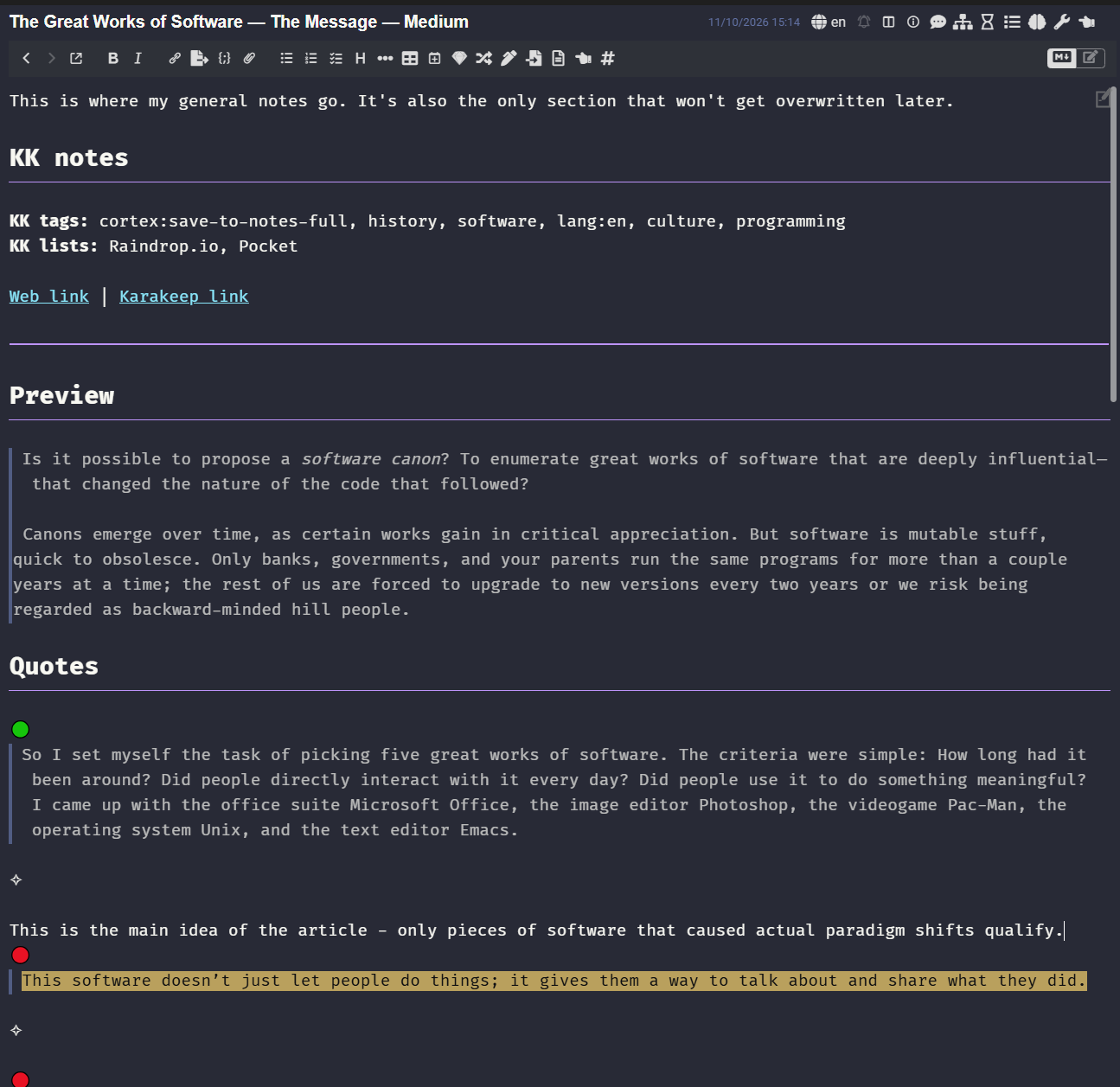
The plugin also does some extra things: sets the original article URL in the note's metadata, stores plugin-specific metadata (such as KK ID, etc), sets the note tags.[3]
The sync is unidirectional. If I want a note changed, I will click the KK link and do that in Karakeep. This keeps the process simple and straightforward: everything from the heading "KK notes" onward gets deleted and re-generated with the latest version on every update.
The sync (creation or update of notes) happens automatically every ~20 minutes; but I also have a button that updates the current note immediately.[4]
Implementation side note
I briefly considered publishing this as a stand-alone plugin instead of making it a part of my bunch of personal integrations, but decided against it for one simple reason: there still is no way of using Joplin to sync plugin-specific data. There is a rudimentary way of attaching custom plugin-related data to a specific note, and that's a feature I use a lot, but there doesn't seem to be any good way of doing it without a note. Some plugins and tools - including my Ghoplin (now deprecated and merged into this sync plugin) and the interesting History Panel plugin - put that data into a specific config note, but I dislike that approach.
Since I didn't want another 'config' note, I decided to store the config in my DB (my NocoDB instance). But that makes sharing the plugin with others unviable, so I just merged it into my existing custom sync plugin.
I dunno how exactly Ton does it; I've tried asking, but haven't heard back. ↩︎
I'm considering an update to this - maybe adding a tag that would just scrape the entire article contents and inline the highlights. But I'm not even sure if or how I wanna do that yet. ↩︎
The attentive user might have noticed I put the tags in two places: in the first section of the note, as well as the actual Joplin tags. They're not usually the same: I keep the Joplin tags under strict control and anything that is writing them 'from the outside' must first pass through a whitelist and a mapping. So the Joplin tags are quality controlled, but I still want to see everything that was set in KK in the note. ↩︎
It's the spanner icon in the top right of the screenshot. ↩︎

Comments ()